
31 December 2010, ~17hrs…
Mauritius Telecom’s “technician” calls to tell me that there’s no network card on the laptop.
Surprised, I asked him to double check and he confirmed that there-was-no-network-cable-port on the brand new laptop. I told him to install the ADSL modem using the USB cable instead. To this request, he told me that he tried too, but the operating system could not locate the modem while being connected through USB. I insisted that he should try again.
Let me now give you more details.
Some of you might remember, I recently purchased a laptop for a relative, who then applied for a 3GB ADSL connection. A few days afterwards, i.e. on the 31st December 2010, a MT technician went to their place for the installation and configuration of the modem.
Note : Mauritius Telecom charges Rs1000 for this installation done during normal working hours.
As you have probably guessed, the “technician” was surely in a hurry to reach home on this last day of 2010, without being able to connect the laptop to internet.
Being the one who understands these geek things in the family, I was the one who was again called there to fix things. When I reached there, the relative told me that the laptop should probably be returned to the seller since the Mauritius Telecom’s “technician” said that it was not a good one. The relative also showed me a piece of paper, on which were written the following :

The professional’s advice :
The technician told them
- about the “missing” LAN card and
- additionally, he gave them some piece of advice, freely : Change the current Windows 7 to either Windows XP (SP2/3) or Windows Vista or
- Uninstall some apps due to high performance in task manager.
I still can’t understand the last 2 points and the connection with the modem.
[yashvinblogsfan]
Missing LAN
Was he blind? Or perhaps he doesn’t know where a LAN cable should be connected?
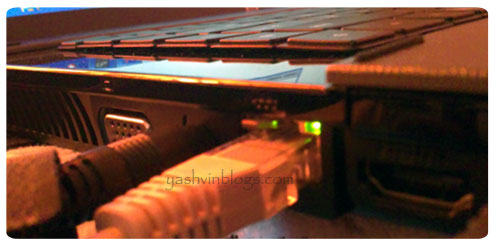
As you can see, the LAN port is there. Some miracle? I should perhaps believe in god in that case.
Connectivity issues
I connected the LAN cable, went through the installation process and configured the Beetle modem (220BXZ). No connectivity. Tried the same thing with the USB cable, nothing. And yes, the Windows 7 did recognize the USB modem when I was there. To make sure that the problem was not with the laptop, I connected a second laptop running Windows XP. Same problem.
Windows complained about some problems with the router :

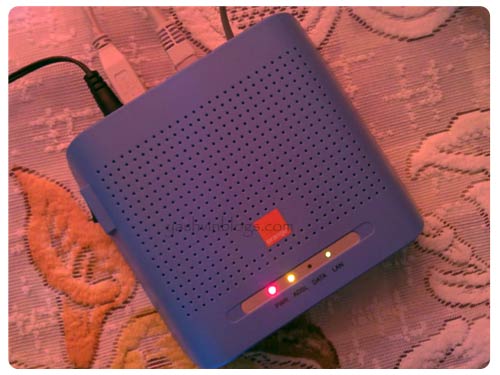
I checked the lights on the modem :

Power, ADSL : Lighting steadily
Data : Off
LAN : Blinking Green and sometimes Red.
Calling 8900#2
I phoned the Orange Customer Care, listened to their waiting tune for some 5 minutes. After several additional calls and requests to reset/test the telephone line, the people out there discovered that there was an issue with the synchronization of the modem.
They told me that there are going to log a complaint and a team will come to check it after a few days. As promised, 2-3 days later (i.e. today), Mauritius Telecom technician(s) went there and the problem was solved.
During the day, I called back the Customer Care to complain about the SUPER-Technician who (1) not only charged an installation fee of Rs1000, but (2) he also found out that the laptop has no network card, (3) was unable to connect the modem using USB, (4) advised to downgrade the operating system or uninstall programs, (5) noticed high performance in the task manager of a 1-2 weeks old laptop which has the strict basic and bundled software installed.
The customer care agent was unable to attend to my requests. She said that she tried her best but she could not redirect me to the proper person with whom I could eventually write an official complaint against the “technician” and also, discuss to cut off that “installation fee” that was totally useless.
She lastly advised me to report the problem to some guys who will probably phone at the relative’s home to inquire if they are really connected. Some kind of follow up. Never got that call.
I will not end this matter here. This technician surely needs some $#%@!
Before ending, can you please share my facebook fan page around on your Facebook profile? Use the button below or click here 🙂
 Yashvinblogs
HAHA!!!
Technician = n00b.
😀
LikeLike
Zotte pou bien passe boule la.
LikeLike
That must be the most expensive bit of paper… 😀 You must fight to get back that installation fee!!!
Surely the technician is completely untrained guy, must have looked for the ethernet port at the back and thought “Pena port par derriere??? E avoy sa merde doo!” .. and when he saw that Windows 7 was running, he thought “Ki couyonade sa! Zamer mone instal sa lor sa Windows la… banela pane montrer moi sa”
LOL.. This post made my day!
LikeLike
I am in the process of looking for a new ISP, so I guess MT is FAIL right? Think I will move to Emtel..
LikeLike
Shame on orange!! Service is $
LikeLike
Oh dear. I hope this is due to New Year excitement and not incompetence.
Hope your relative gets his Rs1000 back for the lack of service.
LikeLike
LOL!!! Mega LOL!!!!!!
Indeed… MT “Technicians”!! hahahaaha
must screw them!!
Btw, abt the advise tht she gave u to report the problem to some guys who will probably phone at the relative’s home to inquire if they are really connected. Some kind of follow up. u said u neva got that call… wait for it, ur supposed to get it.. cuz i got it once.. they’ll probably fone u in the coming weeks.. (enfin..hope so!lol)
aniwayy, manz r li 😉
LikeLike
1 mari noob pou pa ressi trouve sa pou fer leconomie MT asT so bane technicien dans bazar lol fran 1 port LAN foD couillon meme pou pa trouve sa…
LikeLike
Classic stuff..
Once a technician went to a friend’s place to install MyT, the installation was troublesome with laptop not being to communicate with the router. Now our technician called his headquarters and my friend figured out someone at the other end was explaining to the technician step by step how to..(wait for it)…..open a cmd prompt session and how to use ‘ping’…. finally my friend resolved the problem himself…..
LikeLike
sa kantiter fite ar ki mo gagne zafaire ar support lore 8902 surtout call centre la.. fouff.. mo pas comprend kuman orange employe bane dimoune kumesa. lol. myt support is one of the worse support i experience
LikeLike
Scr3w MT staffs. Donne li so lesson.
Li vremem ene n00b. Mo sir so neveu geek 7 ans ine dire Windows XP pli bon. Li pren li pu g33k aster. Li fan nuvel la partout sans conne nanien.
LikeLike
sa kuman dir to pu tire sa revange lin 2range tw n 31 dec sa 😀
LikeLike
Samem apel Mauritius Telecom sa…. zot pas kone fer travail kuma bizen… bizen maltraite zot sa….. lor zot 8900 la… crime sa… gagne letemps fer 1 dithe sa….. letemp ki banla pren call la…
LikeLike
Heyy hii Yash, LooOl inutile dir toi cmnt bane MT tech la eT.. Lollz.
Zot pa comprend narien.. Pa coner cmnt zot rente MT..
En passant, mone configure 2 router ADSL cot 2 cam et guess what sa splitter RG15 la c a dir splitter pu ligne telephone la ti faulty..
Et pire, zot pa rode replace it, zot fer client la paye pu sa splitter la..
Dont knw y they behave like dat, maybe bcoz they r z sole ISP in Mru.. :S They r really disgusting..
LikeLike
Pfff… Pas menti, bann “techniciens” MT vraiment cons (pou pa dire autrechose). Mo’nn temoigne enn situation similaire kot enn dimoune: premier “tech” vini ek li dire: ou ena enn problem dans ou boite connection telephone. Apré boukou maltraité diplomatique (sa, c’est enn methode kott ou bizin ena zis ou sang-froid ek lozik: manz ar bann dimoun con sans zour zott, mais assomm zott a-koutt lozik kri-kri, napa donn aukenn chance reply back, dessann zot calson sans faire malelvé) Déziem tech vini, batt 2-3 manev lor control panel, tou problem dressé korek-korek, ADSL functional 100%. Ki ou dire?
LikeLike
Hi Yashwin .I’m fighting a recently developed keyboardphobia to write this . Everybody should spread the word that paying Rs1000 to connect an adsl modem is !!?? [can’t find the proper word].
I suppose someone installing adsl for the 1st time might think it requires some specific skill in which only MT technician are trained – specially when they hear about the fee claimed by MT .
Normally , it should take less than a minute to connect that modem . The reason it did not work certainly comes from the MT server : the green DATA light being off indicates just that .
For 4 or 5 days starting 23 December I was not able to connect to the internet . I’m probably not the only one . There must have been a sharp increase in connection volume in the last week of December and MT could have been selling beyond its capacity . Maybe that was the real cause of your relative’s problem .
LikeLike
So they haven’t heard about Windows 7 yet..
There another problem that I find in almost every MyT installation at my friends/relatives have: they cannot connect to the livebox via WiFi… The technician couldn’t do it at my place as well! The solution was simple: just to login on the livebox and set the parameters for the WiFi! Even a kid could have done that, given instructions…
LikeLike
Ala ki arriver kan prend dimoune par backing politique pou travail. Ena boucoup technicien competent ki met dans coin acause backing. A bon entendeur salut
LikeLike
Your relative should ask for the Rs 1000 back!(or at least 50% back.)
LikeLike
ene ban toutouk ki travail labas.
enfin si capave dire le mot “travail” meme
LikeLike
Follow up
I was at the Telecom’s Tower customer care a few mins ago. The agent there sent a request to waive off the ‘installation’ fee.
As for the technician’s professionalism, she asked me to write a complaint to the direction of MT. Hehe.
LikeLike
@ Yashvin:
“Waive the ‘installation’ fee?”
I now suggest you send a claim for Rs 1,000 (plus VAT?) for doing someone else’s job. Because their accepting to waive the fee implies that they had the job done, not by them, but by you.
Dakor, pa dakor?
A
malinméchant, méchant et demi! 🙂 heheLikeLike
des fois mo penC sa bne soi disan technicien la..zot get paid for nothing..plusieurs foi kan mo ggn prob..mo call zot..a la fin zot soi disan met complainte..mai lerla kan moem mo essay dress li..mo resi..
lorla pa tigit atan bzn atan pu ggn laligne customer care la..fran tou..kot ti bzn upgrade..MT p degrader..service pa bon ditou..pli aler nu net so kaliT p vine mediocre..lezot plas dan lemonde kot nivo e vitesse internet p monter considerablement..isi dan nu “CYBER ISLAND” nu p reculer..ine gran temp pu nu montrer nu rage contre sa bne zafr la..MBC pa dne nu football em..enn ta dimun dan moris get football lor net..y compri moem..mai ariv ler kot nu pa resi geT akz low bandwith ki nu ena..
aster mo myT moem mo dreC…zis kan difil pa bon ki bne la vini..:/
LikeLike
LOL …that’s funny
I think that may be the guy was a bit drUnK …
BTW they’ll call u for sure, according to their protocol …(no worry)
LikeLike
moi mo p gagn problem ek MT depuis le 5 jan, zordi nu le 15.
ene technicien in paC samedi dernier et li dire problem cable sa. li dire li pa pou kpav repare sa, lundi ene lot technicien pou paC. mais bon, mone atane kumen ene grand gana. personne pane vini.
mo ti envi koner, eski mo supposer paye pou sa 10 jrs mo pane servi MT la. mo penC li pa logique mo paye pou ene service mo pa gagner. ki zot dire??
merci.. 😛
P.S : MT service pli nimporte ki exister! so technicien pli nimporte enkor!!
LikeLike
Good morning @milli.
Let me reassure you, you can fight for your case. It’s no use calling the Customer Care, they really s*ck. Go directly to a Mauritius Telecom office (I would advise Telecom Tower’s) and tell them that you dont accept to pay for these days were your ADSL is not working for some reason, independent of you. Everything is on their side.
Instead of paying a full month’s bill, they should bill you a pro-rata one. Good luck, and keep us informed.
Bon weekend!
LikeLike
Thank god I dont suffer such problems with emtel’s technicians. What emtel does is that they hire company on contract to act as their technicians, if customer feedback is not good, they simply terminate the contract. Thankfully, the current batch of technicians are extremely competent. And as for the billing, emtel automatically reduces your billl if your connection was offline for a day…
LikeLike
1000r la pa ena installation cable tou sa la dan??
LikeLike
hi, does someone know the step on how to configure the modem beetel?
1 friend fek gagne so modem, but MT haven’t given the instruction on how to connect it.
My friend refuse to pay Rs1000 for the tech.
LikeLike
@Ramesh : Are you sure your friend did not get the instruction sheet, together with the username and password?
Unfortunately, I dont have the exact steps but dont worry, I am sure someone will answer to you on this blog post. Keep checking.
LikeLike
He only got a invoice on which the username and password was written.
I don’t understand why MT people behave like this……
LikeLike
@Ramesh, have you got the steps by steps procedure? Because your comment is 1 week old, kapav tone fini gagne ene tutorial! Avan mo explik tw, confirm mw stp!
LikeLike
Hello @Lapin!
Would you mind giving the exact steps here? They may be of some use to anyone else in need for instructions.
Thank you very much!
YA
LikeLike
Ok, I will explain the procedures in steps by steps!
Assume you have already your accessories: The Beetel modem, the RJ45 cable, two RJ11 cables, the modem adaptor and the splitter!
1/ Switch on your computer!
2/ Plug the RJ11 cable in the modem port (line) and the other end to the splitter (modem). Don’t forget you have two RJ11 cables, so the last one plug it to your telephone and the other end to the splitter (phone)
3/ Then, plug your existing RJ11 cable which comes from your telephone socket to the splitter (line).
4/ After that, plug your RJ45 cable to your modem (Ethernet) and to your LAN card.
5/ Then, plug your modem’s adaptor to the modem and to the electricity socket.
6/ Switch on the modem.
7/ You will find the PC/USB and the POWER will blink on your modem.
8/ Now, open your browser and insert 192.168.1.1 as address.
9/ Click Enter.
10/ You will find a window where you have to insert your username and password.
11/ The default username is ‘admin’ and password as ‘password’.
12/ Press Enter
13/ Now, another window will appear.
14/ Look on the left panel of the window, you will see ‘Advanced Setup’.
15/ Click on it.
16/ Another window will appear.
17/ Click on ‘Edit’.
18/ Click ‘Next’.
19/ Click ‘Next’ again.
20/ Now you will see the forms where you will have to insert your given username and password by Mauritius Telecom. (NOTE: Always put @tplus at the end of the username).
21/ Click ‘Next’.
22/ Click ‘Next’ again.
23/ Click ‘Save’.
24/ Click on ‘Save/Reboot’.
25/ Your modem has been configured and will reboot in 2 minutes or less.
26/ Close your configuration window now.
27/ Mission accomplished, you can surf on the internet.
Hope you have understood the procedures well, if you have problems, do ask me. Thank you…bye!
LikeLike
@Lapin: Thanks a lot for the ultra-detailed instructions 🙂
UPDATE
Mauritius Telecom called me a few minutes ago. They told me that they will start the investigation but they first need the name of the client. So, now things are going to be serious 😉
wooooooooooooooooo!
LikeLike
its ok!
LikeLike
thanks for the steps.
I did everything as type above, except i didn’t put the @tplus.
Thank you, I really appropriate it.
They did give him the instruction but my friend dad threw the paper away……….lol
LikeLike
Many people do the same error.
@Yashvin, do you mean about the complaint you made on the technician?
LikeLike
Yes @Lapin, they called me about the complaint made:-)
LikeLike
i am another upset customer to be of Mauritius Telecom
I needed a new line installed to get MyT installed and Yes I cannot apply to get Internet until I have had the line installed. That’s technology from Mauritius Telecom, bunch of Idiots
I took a day off and they said they will come between 8.30 to 1.30, it is now 2.48 and still no sign.
MT say the installation job is done by contractors, so they putting the blame on someone else. calling 8900 is just useless, these call centre guys cant do anything.
I can’t even get hold of the name of the person who is responsible for these things. I did submitted my application on the 28th of December.
I don’t think they will turn up today and there is one I can really complain to, if you know please supply his details.
LikeLike
🙂 @rajiv, you’ll have to bug them a few times, go to different Orange shops… that’s our dear Orange… I’m so lucky to have got my phone line in 10 weeks (sic).. and MyT adds 2 more weeks… Same case, I don’t need a fixed phone, I just need broadband.
LikeLike
Hi Everyone here!
I have a similar problem to the above. Actually I have recently subscribed to ADSL 3GB Home and opt to complete the installation on my own since it seemed really easy at first glance. I managed to connect everything and complete the steps required to configure the modem (i.e. go onto 192.168.1.1, advanced setup, … up to save/reboot of modem). All goes well.
However, amongst the last steps on the configuration sheet MT provided me, I had to connect the USB cable of modem to my laptop and complete its installation using the software CD that accompanied the modem. The problem now arises since the driver on the software CD is apparently designed for Windows 2000/98/XP while I have Windows 7 (64 bit) installed on the laptop. The driver installation could not be completed and therefore the laptop recognises some sort of problems with the device (i.e. the modem).
Each time I switch on the modem, I do manage to get conected to the internet but after a while the connection goes off. Again I should swift off/on the modem to get the connection. Basically I presume the problem lies with the driver and incompatibility with Windows 7.
So could anyone please be kind enough to let me know where I can manage to get the proper drivers for Windows 7?
The modem details are as follows:
Beetel 220 BX2 ADSL 2+ Modem
The software CD contains an .exe setup file designed to install “ADSL USD Driver 1.3”.
Thanks in anticipation!
LikeLike
@Yashvin:
Si mo’nn comprend bien, problem occurred on 31 Dec’10, and it’s on 27 Jan’11 that they call you?? Venn-sett zour apré?? Tchiououou!
And now just a phone call gets you to think that “things are going to be serious”?
Mo bien curieux conner ki kalité action zott pou prend.
Pa cwar mo enn bebett-negatif, mais mem mo coté non-obscur oussi pe dire moi ki c’est ziss enn “delaying tactic” ha.
Patience guéri la-gale…
LikeLike
Better take MyT, you get a decent Sagem Wifi enabled modem in place of the Indian made Beetel.
LikeLike
Am having the same problem with my modem the data light is off, did not contact MT for now coz it will be useless. can anyone help to get this adsl work again. When i diagnose it say “THE DNS SERVER NOT RESPONDING”.
thanks
LikeLike
How they suck!!
Last month on the 13th April, i made an application for a new telephone line at the Mauritius Telecom Shop of Quatre-Bornes.They told me that within a week, the technician will come and make the installation (Rs 1000 cost).
As promise the technicians came on Saturday 16th April. Make the enough installation, ( they had some problem cause already have two telephone line home), thus they make the connection and test it.( i was not here to assist that, so my maid confirm when they call to confirm whether the line is OK. Though they take back their telephone which mean the new tel connection need a new phone.
On the next Monday, i went to the nearest, telecom shop and made the necessary payment for them to activate my phone line. They proposed me to by a telephone, which i refused cause with the new line its only for a third internet connection( by the way i have already 2 MY t connection of 1mbps, and 2mbps) the third one is for my new server on which all my student will connect to access online training.
By the way, today MY T technician come at my house to make, the installation. As usual i’m at work though my maid let them make their work.
They call me at 13:25, to tell me that it’s impossible to connect the server cant connect the internet.
here my server: processor Intel Xeon, 512 ram, 500gb hdd.
Though i told them to look one more time cause, its funny yesterday night i have connected the server via my 2mb connection.
Great can continue working…my phone ring again>>ops my home phone number>
(me)Hello>>(tech)Oui pas pou capav configurer sa boss, li pas p detecter ou drive ek no connection?? ou bizin change ou bizin upgrade ou server??
(me)quoi upgrade?? qui pou upgrade la dans?? 1 windows server 2008 r2??windows 7 on vmware..pas p comprend la!!!
(tech) euhh(i really hear the tech say euhhhhh) naa pas sa mais pas p gagne connecter capav( wow “”capav””) c acose p roule deux system lor la.
(me) Ah bon, ok mais laisser tous quand je viendrai je ferais la connection.
(tech) ok mo p met lor n papier c ki ou bizin changer si ou pas capav connect boss.
(me) OK merci pou ou gentilles alors.
I came home and made the connection!! The only thing what they should have done is only to point my DNS toward my server itself and the default gateway blank.
Pfffff at the end of the month i must pay for that!!!! super c pays….
LikeLike
im not on the side of MT but as far as i know you pay for the installation 2000 and why you said ~Pfffff at the end of the month i must pay for that~
if you have your own server MT Tech wont touch it MY FRIEND
DID MT INSTALL YOUR SERVER??
NO…
BUT WHY YOU WOULD LIKE THEM TO CONFIGURE IT ON YOUR LAPTOP????
LikeLike
Hi @joachim.
Definitely, we can’t say that you had a nice and productive experience with the technicians, but I have no idea why you have associated the country with this “misadventure”, I quote :
“super c pays….”
I don’t think that it is a good idea (and meaningful) to put the country to blame for anything that happen to you.
Anyways, thanks for your comment.
Y.A
LikeLike
Hi i have got a problem with my adsl(Beetel 220 BX2 ADSL 2+ Modem)the cd that MT ORANGE give me to instal my usb cable is not good for Windows 7 and MT give me a setup manuel to setup the modem that was not good i look a friend to look for the problem so he tel me that the setup is not good
so he put anthere setup so i got connet with adsl but sitil problem with usb cable what i must do ?
LikeLike
Hello,
I’ve got a MyT subscription from Orange and i would like to know if it is possible to know if someone has hacked my security key and is using my wifi? my internet is so slow and it takes a lot of time to open an internet page.
LikeLike
Anyone knows how to increase your adsl speed! It works for myt I’ve change a 512mb to 1mb password and it works grt8! But adsl??
LikeLike
The problem is not the technician. The problem is with MT. MT is making so much money but still doesnt provide proper training to these employees and the latter themselves know how they have to get things working.
LikeLike
have you ever got the problems u subcribe to 1 mb connection of adsl at cost of 1000 and after the tech verified told its ok but actually my downloads stream is 256 kbps i dont know how the hell orange take such fool to work in their company. after i verify and talk with customer care they told me that my connection is 1mb but the cause is that the techician did not configured it on a 1 mb mega server but 256 as maybe he was too busy to even plug a ethernet cable inyo hte server to synchronise it to 1 mb now orange have to refund me .. wat a world . i think this company take people on recommendation wht hte fcuk .
LikeLike